If the 9amHealth app looks a little different today, you’re not imagining it. We've updated the main navigation to make the app easier to use, especially when you want to move forward in your program.
You may notice a few changes in the 9amHealth app today. We updated the navigation to make it easier to find the tools you use most.
This update came from member feedback. Many members told us it was easy to use a tool when it showed up as a task, but harder to go back later and find it again.
So we made a change. Now your key program tools are easier to reach, even when they are not part of a current task.
The big idea: the app is your plan
Your plan is not a single tab. It’s the set of tools you use to keep making progress. That’s why we centered the app around the program tools that help you most:
- Your educational journey, including completed modules you may want to revisit
- Your meal plans, so planning stays practical and easy to keep up with
- Your medications, so you can always see what you’re taking at a glance
To make space for those tools, we simplified the navigation.
Learn: your modules and journey
In Learn, you can:
- continue your current modules
- go back to completed modules anytime
- see your learning content in one place
Meals: your meal plans
In Meals, you can find your meal plans more easily, so it is simpler to plan ahead and make day-to-day food choices.
If you have used meal plans before, nothing has changed about the tool itself. It just has a clearer place in the app.

What else changed
Profile and Settings moved
Your Profile and Settings areare now in the top left corner of the Home screen.
That is where you can find things like your account details, preferences, and your Consistency Score.
This is especially helpful if you’ve completed a module and want to go back without waiting for a task to resurface it.
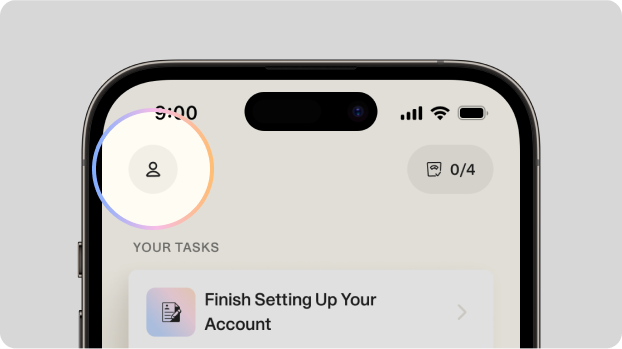
Profile & Settings are now in the top left of your Home screen
Medications moved to the Home screen
The My Plan tab has been removed. Your medications are now listed directly on the Home screen, so they are easier to find when you need them.
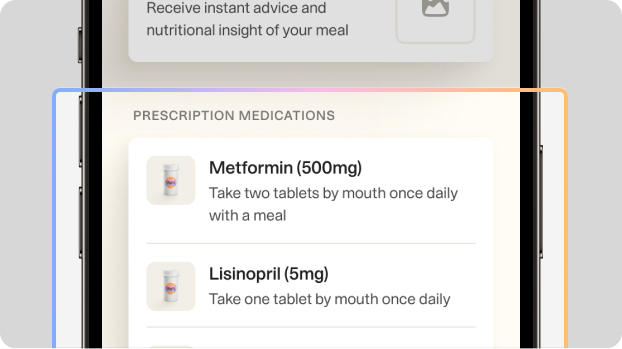
Medications are now listed directly on your Home screen
Getting used to the update
Even positive changes can feel annoying for a day or two. Most of the time, it’s not that anything is missing, it’s that your brain is looking for it in the old place. Our goal is to make the app simpler to use over time and make your most important tools easier to find.
Did I lose anything?
No. Nothing has been removed from your care or program. Everything is still here, just organized in a simpler way.
I used to rely on tasks. Do I still have them?
Yes. Tasks are still available. Now you can also go directly to Learn and Meals anytime, even without a task reminder.
How do I revisit a completed module?
Open the app and go to Learn. You can return to completed modules there anytime.
Are my messages with my Care Team affected?
No. This update does not affect your messages or access to your Care Team.
Can I switch back to the old navigation?
Not right now. This new layout is designed to make the app easier to use over time.
What should I do if something looks missing or incorrect?
Send a message to your Care Team in chat. If you can, include a screenshot and a short note about what you expected to see. That helps us troubleshoot faster.
About the authors
Vivien turns complex healthcare into products people actually get and use. With serious experience in the trenches of digital care and a stubborn refusal to make boring stuff, he’s on a mission to make health tech less frustrating and more human.
Recent articles
As your health changes, your medications may change too
What to eat during perimenopause and menopause
Understanding body fat and muscle mass
Get the latest tips to your inbox!
The care your need to feel care-free
9amHealth gives you the tools you need to manage your prediabetes and type 2 diabetes with ease.